import matplotlib.pyplot as plt
import numpy as npSqueeze your notebooks
How it works
Here is a small example to show how you can run nbsqueeze from a notebook. Let’s first create an in-line plot with matplotlib.
x = np.arange(40)
y = np.cos(x)

fig, ax = plt.subplots(figsize=[2, 3])
ax.plot(x, y, 'g')
..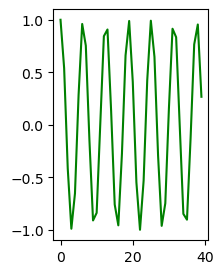
The output plot image that we see above is encoded as a long base64 encoded png string, somewhere in this notebook. If you open this notebook file with a text editor you would see this corresponding json code for the image in the cell above:
{
 "data": {
  "image/png": "iVBORw0KGgoAAAANSUhEUgAAAK...A.VERY.LONG.STRING.HERE...",
  "text/plain": [
   "<Figure size 144x216 with 1 Axes>"
  ]
 },
We can use the squeeze_this_nb function to extract the very long base64 png string as above, save the image as a png file in the ./images/ folder, and replace the long string with a short link to the png file.
from nbsqueeze import squeeze_this_nbsqueeze_this_nb()If we would now look at the json code of this notebook with a text editor, one would find the following updated json code:
{
 "data": {
  "text/html": [
   "..",
   "<img src=\"./images/00_extract_361824cd7e.png\">"
  ]
 },
Much shorter! This means my notebook file size is much smaller. If we check the file system, the corresponding png image file is present in the ./images/ sub folder:
.
├── 00_extract.ipynb
└── images
└── 00_extract_361824cd7e.pngsqueeze_this_nb
squeeze_this_nb (nb_path=None, overwrite=True, verbose=False)
Extract figure png strings from notebook nb_path.
If nb_path is None, current notebook is used.
replace_strings
replace_strings (nb_path, url_list, overwrite=True, verbose=False)
Replace base64 png strings with links.
export_pngs
export_pngs (nb_path, cell_pngs, imdir_path)
Save base64 png strings from cell_pngs as png images in img_dir.
make_imdir
make_imdir (nb_path)
Create standard image subdirectory ‘images’ in current directory for notebook file nb_path.
Returns: imdir_path
find_png_strings
find_png_strings (nb_path)
Find cells with inline base64 image/png strings in notebook_file.
Returns: [[cell_idx, md5, base64_string], …]